
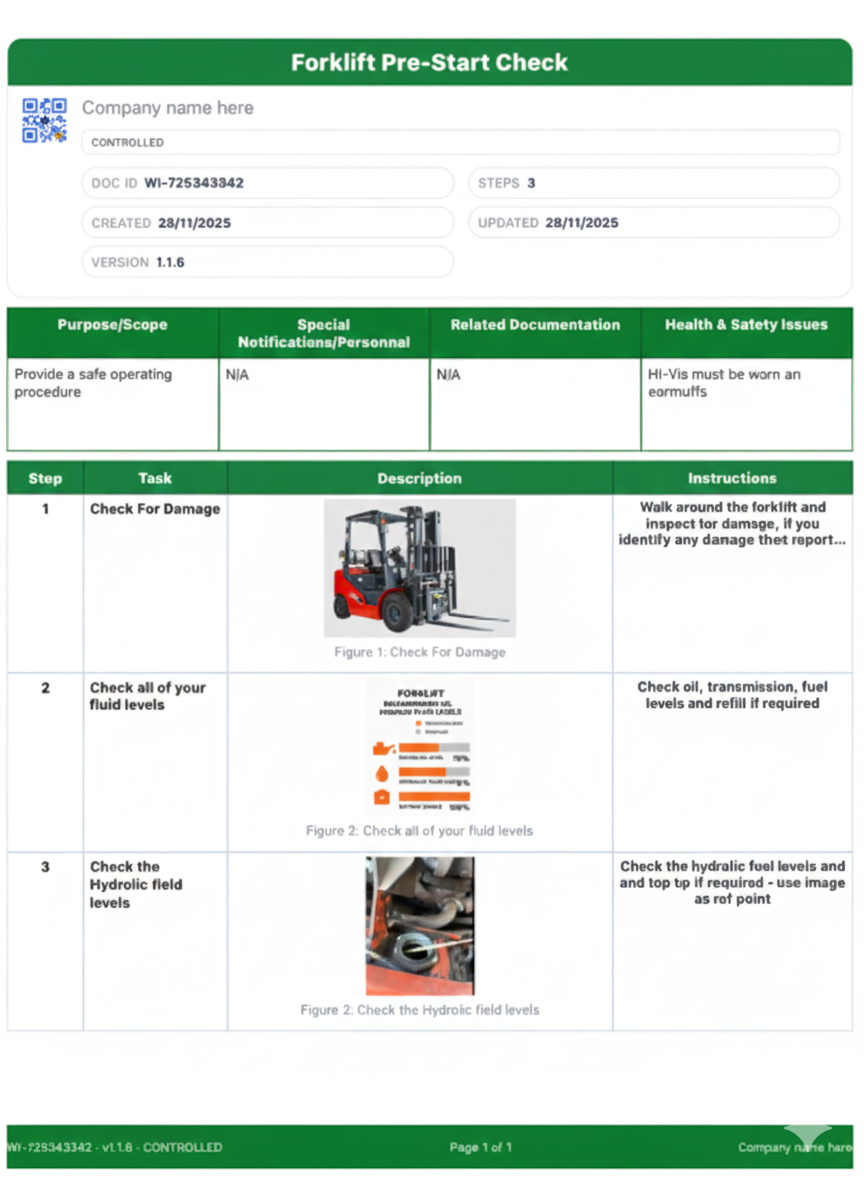
If you’ve ever been “voluntold” to create SOP or work instructions at your job, you know it’s not as simple as it sounds. You’re already juggling your real responsibilities, and now you’re expected to magically turn tribal knowledge, old emails, random photos, and half-finished Word docs into clear procedures.
It’s no wonder so many people search for how to create SOP documents that are clear, fast to make, and actually used on the job. The reality is: most SOPs end up confusing, outdated, or sitting in a folder no one opens. But it doesn’t have to be that way.
In this article, we’ll break down what makes a good SOP (Standard Operating Procedure), how to build one step by step, and how to make the whole process faster and less painful—especially if you’re creating work instructions on the go. We’ll also look at how tools like the Quick SOP App can support your process without turning this into a sales pitch. Think of it as a practical guide to getting control over your documentation so your team can work safer, faster, and with fewer mistakes.

Why Trying to Create SOP Feels So Hard (And Why It’s Not Your Fault)
Most on-the-job SOP and work instruction creators didn’t sign up to be documentation specialists. You’re often:
If this sounds like you, you’re not bad at documentation — you just don’t have a simple system to capture what you already know in a way people can follow.
- Scattered information
- Photos on your phone
- Instructions in email chains or chat
- Old PDFs no one wants to edit
- No clear structure
- Steps out of order
- Missing details (like PPE, hazards, or tools)
- No space for notes or variations
- Time pressure
- You’re documenting in between real work
- Audits, onboarding, or safety checks are looming
- A supervisor, team leader, or trainer
- A safety or compliance person
- A small business owner who “does everything”
You know how the work actually happens — but turning that into a clear, step-by-step document is a different skill set. Common problems:
What a “Good” SOP Looks Like When You Create SOP Documents
Before you create SOP documents, it helps to know what “good” looks like. A clear SOP or work instruction should:
- Be easy to scan
People should be able to quickly see what to do, in what order. - Use real language
Everyday, simple wording beats formal jargon. - Show, not just tell
Photos or visuals of each step make instructions much easier to follow. - Cover the important context
Things like:- Purpose of the task
- Required tools and materials
- Safety notes / PPE
- Common mistakes to avoid
- Be easy to update
If updating an SOP feels like a chore, it will get out of date—and then ignored.
Whether you use Word, PDFs, or a dedicated app like Quick SOP, these principles stay the same. The tool should support the structure, not make it more complicated.
Step-by-Step: How to Create SOP That People Actually Follow
Let’s walk through a simple process you can reuse for any task — from machine setup, to cleaning procedures, to onboarding steps.
1. Start with one real workflow
Don’t try to document everything at once. Pick one task people do often, such as:
- Start-up procedure for a machine
- Site sign-in and safety check
- Cleaning a piece of equipment
- Packing and labeling an order
Ask yourself: What do people keep asking me about? Where do mistakes happen? Start there.
2. Watch the task being done (or walk through it yourself)
If possible, watch someone do the task from start to finish. Take:
- Quick notes for each step
- Photos at key moments
You don’t need fancy wording yet. Just capture the flow:
- What’s the first thing they do?
- What must be done in a specific order?
- Where do mistakes usually happen?
3. Turn your notes into clear, numbered steps
Now it’s time to structure. For each step:
- Start with a verb (e.g., “Check”, “Open”, “Secure”, “Attach”)
- Keep sentences short and direct
- Only say what’s needed to do the task safely and correctly
Example:
- Put on required PPE (safety glasses and gloves).
- Switch off the main power and lockout if required.
- Open the side panel using the Allen key.
This is where an app like Quick SOP can help, because it gives you a clean step-by-step format out of the box so you don’t have to fight with formatting or bullet styles.
Using Photos to Make Instructions Crystal Clear
A major upgrade when you create SOP documents is adding photos to each step. This helps especially for hands-on roles and multilingual teams.
You can:
- Show the exact switch, panel, or part to interact with
- Highlight correct vs. incorrect setups
- Reduce misinterpretation when words aren’t enough
Practical tips:
- Take photos from the operator’s point of view, not from far away
- Keep the background simple where possible
- Use arrows or annotations if your tool supports it
In Quick SOP, you can add photos directly to steps on your iPhone while you’re on the job, instead of doing it later at your desk. That means instructions match reality, not what you think happens from memory.

How to Create SOP Documents Faster (Without Losing Quality)
Speed matters, especially when creating documentation on top of your day job. Here are some ways to move faster without cutting corners.
Reuse templates and layouts to create SOP
If every SOP starts from a blank page, you’ll burn out quickly. Instead, use a consistent structure like:
- Title + brief purpose
- Related documents (e.g., checklists, risk assessments)
- Required tools and materials
- PPE and safety notes
- Step-by-step instructions with photos
- Final checks / sign-off
Tools like Quick SOP let you use ready-made templates and layouts so every document looks similar and professional. That consistency is great for audits and training.
Duplicate and adapt
- Different machine models
- Different customer requirements
- Slight variations in workflow
Once you’ve created one solid SOP, duplicate it for similar tasks and tweak:
This way, you’re not rewriting from scratch every time.
Supporting Multilingual Teams Without Rewriting Everything
If you work with a multi-language workforce, you’ve probably faced this:
- People nod along in training but miss details
- You end up translating on the fly
- Some staff rely on others to interpret
When you create SOP content, it helps to plan for multilingual use from the start:
- Keep language simple and clear
- Avoid idioms and slang
- Use photos as a universal support
In some cases, you may need translated versions of your SOPs. Instead of managing separate, messy files, you can use tools that support optional translations. For example, the Quick SOP app can translate documents into 26+ languages as an in-app purchase, generating a translated output you can share with your team.
That way, you keep one main structure but provide versions people can actually understand.
Keeping SOPs Up to Date (Without Making It a Second Job)
A dusty, outdated SOP is almost worse than no SOP at all. People stop trusting it, and then you’re back to tribal knowledge. To avoid that, build an update habit that doesn’t overwhelm you.
Here are some simple ways:
- Set review triggers
- After incidents or near-misses
- When equipment or process changes
- Before audits or customer visits
- Keep everything in one place
Whether it’s a shared drive, a documentation folder, or an app like Quick SOP, make sure people know where “the latest version” lives. - Make edits easy
If updating means reformatting half a Word document, you’ll avoid it. Choose a system where you can:- Edit a step quickly
- Swap a photo
- Re-export a clean PDF
Again, the right tool should reduce your admin load, not increase it.
Privacy, Ownership, and Sharing: Getting the Balance Right
Another concern for many on-the-job SOP creators is: “Where does all this go, and who can see it?”
Some workplaces deal with:
- Sensitive processes
- Customer-specific procedures
- Internal safety or compliance workflows
If you’re using digital tools, check:
- Are my SOPs stored on my device or in the cloud?
- Can I control what gets exported or shared?
- Is it easy to send a PDF to an auditor, trainer, or team without sharing everything else?
For example, Quick SOP stores SOPs securely on your device and lets you choose what to export and how — email, Messages, AirDrop, Discord, or Files. That balance of privacy and flexibility keeps you in control.
Real-World Example: From Scattered Notes to Usable SOP
Imagine this scenario:
You’re a supervisor in a small manufacturing workshop. New staff keep asking how to set up a machine for a particular product, and mistakes are causing rework and delays.
Instead of writing another long email, you:
- Walk through the setup yourself while a colleague films and you take photos.
- Open an SOP tool on your phone (like Quick SOP) and create a new procedure.
- Add a clear title, purpose, and basic safety notes.
- Write short, numbered steps while the process is fresh in your mind.
- Attach a photo to each step showing what “right” looks like.
- Export a professional PDF and save it in your shared location or print a copy for the workstation.
Now:
- New staff can follow the visual steps
- You don’t have to repeat the same explanation
- You have something concrete to show for training, safety, and audits
That’s the real value when you create SOP documents properly: less friction day to day, not just a ticked box.
Conclusion: Making SOP Creation Simple, Practical, and Sustainable
Creating SOPs and work instructions doesn’t have to be a painful side project that eats your time and energy. When you focus on real workflows, clear steps, helpful photos, and simple templates, you end up with procedures people actually use — not just documents that live in a folder.
Whether you’re a supervisor, safety officer, or small business owner, you can start small: pick one process, capture it clearly, and build from there. Digital tools like the Quick SOP App can make it much easier to create SOP content on your iPhone, add photos, use templates, translate when needed, and export polished PDFs — but the heart of it is still your real-world knowledge.
If you’re ready to reduce mistakes, speed up onboarding, and get your workplace knowledge out of people’s heads and into clear, usable instructions, start with one SOP today. Over time, you’ll build a library of procedures that support your team, instead of weighing you down.